


[VIDEO] Cum oprești risipa în Google Shopping: Automatizarea Custom Label „High Spenders”

Autor
TWOads Agency 2 min de citit
  3 iunie, 2026
In acest video vom vorbi despre o automatizare, care elimina in mod automat produsele care au acumulat cheltuieli cu reclama peste 100 de lei in ultimele 60 de zile si nu au generat nicio vanzare.
Respectivele produse vor fi etichetate cu un custom label 4 cu denumirea high_spenders, vor fi trimise automat intr-un Google Drive si de acolo printr-un supplimental feed in Merchant Center.
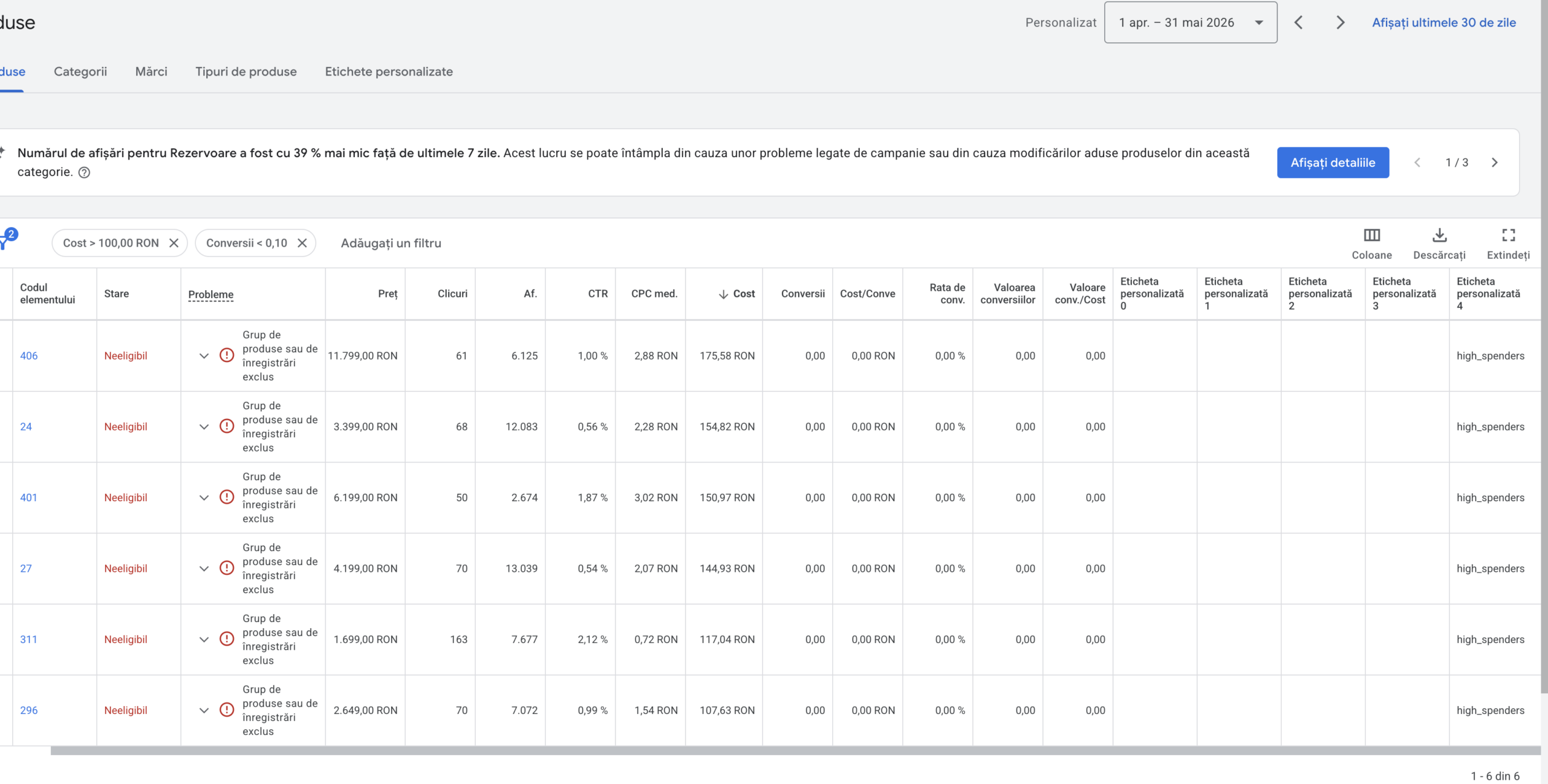
Acest custom label, poate fi ulterior exclus din campaniile de cumparaturi din Google Ads si bugetul va fi distribuit mai eficient.
Pentru ca acesta automatizare sa functioneze, este nevoie sa aveti tracking-ul functional, sa aveti minim 1 produs cu spend peste 100 lei si 0 conversii in ultimele 60 de zile.
Script-ul pentru custom_label_4:
/**
 * Script Google Ads: Identifică produsele "High Spenders"
 * Perioada: Ultimele 60 de zile.
 */

function main() {
  // --- CONFIGURARE ---
  const SPREADSHEET_URL = "adauga aici link-ul catre un fisier excel din Google Drive";
  const COST_THRESHOLD = 100;
  const CONVERSIONS_GOAL = 0;
  const LABEL_VALUE = "high_spenders";
  // -------------------

  try {
    const ss = SpreadsheetApp.openByUrl(SPREADSHEET_URL);
    let sheet = ss.getSheetByName("Produse") || ss.getSheets()[0];

    sheet.clearContents();
    sheet.getRange(1, 1, 1, 2).setValues([["id", "custom_label_4"]]);

    // Calculăm datele pentru ultimele 60 de zile
    const today = new Date();
    const sixtyDaysAgo = new Date(today.getTime() - (60 * 24 * 60 * 60 * 1000));
    const yesterday = new Date(today.getTime() - (24 * 60 * 60 * 1000));

    function formatDate(date) {
      // Formatul trebuie să fie YYYY-MM-DD
      return Utilities.formatDate(date, AdsApp.currentAccount().getTimeZone(), "yyyy-MM-dd");
    }

    // IMPORTANT: Am adăugat ghilimele simple ' în jurul datelor
    const dateRange = "'" + formatDate(sixtyDaysAgo) + "' AND '" + formatDate(yesterday) + "'";

    const query = "SELECT segments.product_item_id " +
                  "FROM shopping_performance_view " +
                  "WHERE metrics.cost_micros > " + (COST_THRESHOLD * 1000000) + " " +
                  "AND metrics.conversions = " + CONVERSIONS_GOAL + " " +
                  "AND segments.date BETWEEN " + dateRange;

    const report = AdsApp.report(query);
    const rows = report.rows();
    const dataToWrite = [];

    while (rows.hasNext()) {
      const row = rows.next();
      if (row['segments.product_item_id']) {
        dataToWrite.push([row['segments.product_item_id'], LABEL_VALUE]);
      }
    }

    if (dataToWrite.length > 0) {
      sheet.getRange(2, 1, dataToWrite.length, 2).setValues(dataToWrite);
      Logger.log("Succes! Am găsit " + dataToWrite.length + " produse.");
    } else {
      Logger.log("Nu am găsit produse pentru acest interval.");
    }

  } catch (e) {
    Logger.log("Eroare critică: " + e.toString());
  }
}
Iata pasii in urmatorul video:
Contact

Îți mulțumim pentru mesaj!
Suntem încântați să te ajutăm. Te vom contacta în cel mai scurt timp posibil!